
03 / Brand-trained conversations Updated
AI Chatbot
Your business knowledge. Your brand’s voice.
A custom-built chatbot for WordPress, trained on your business materials and website content—not the open internet.
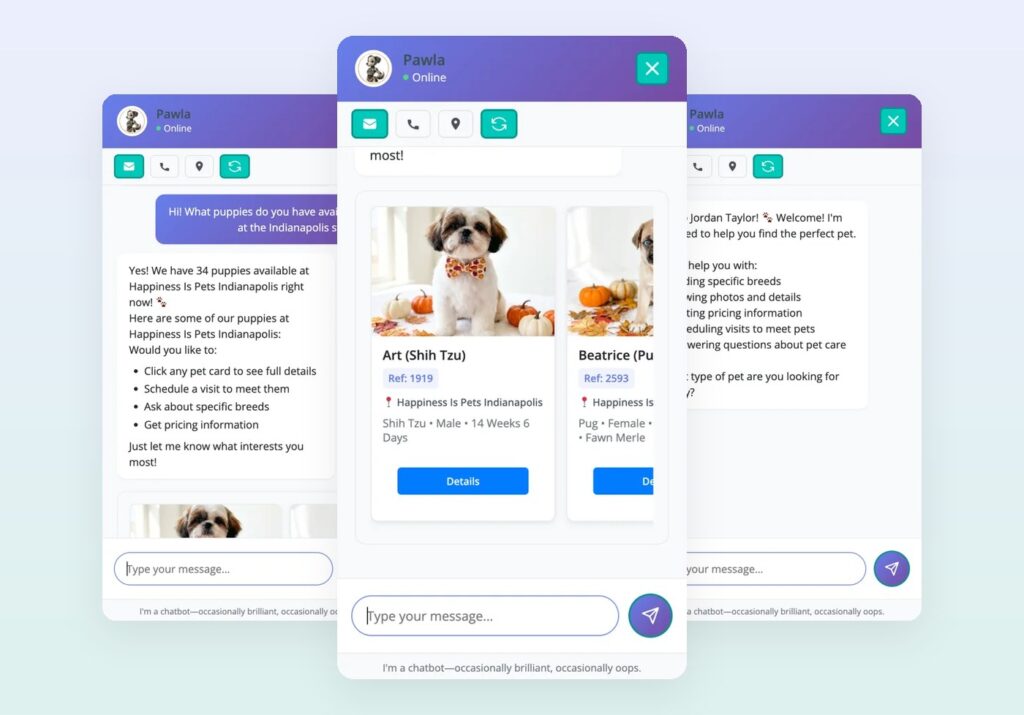
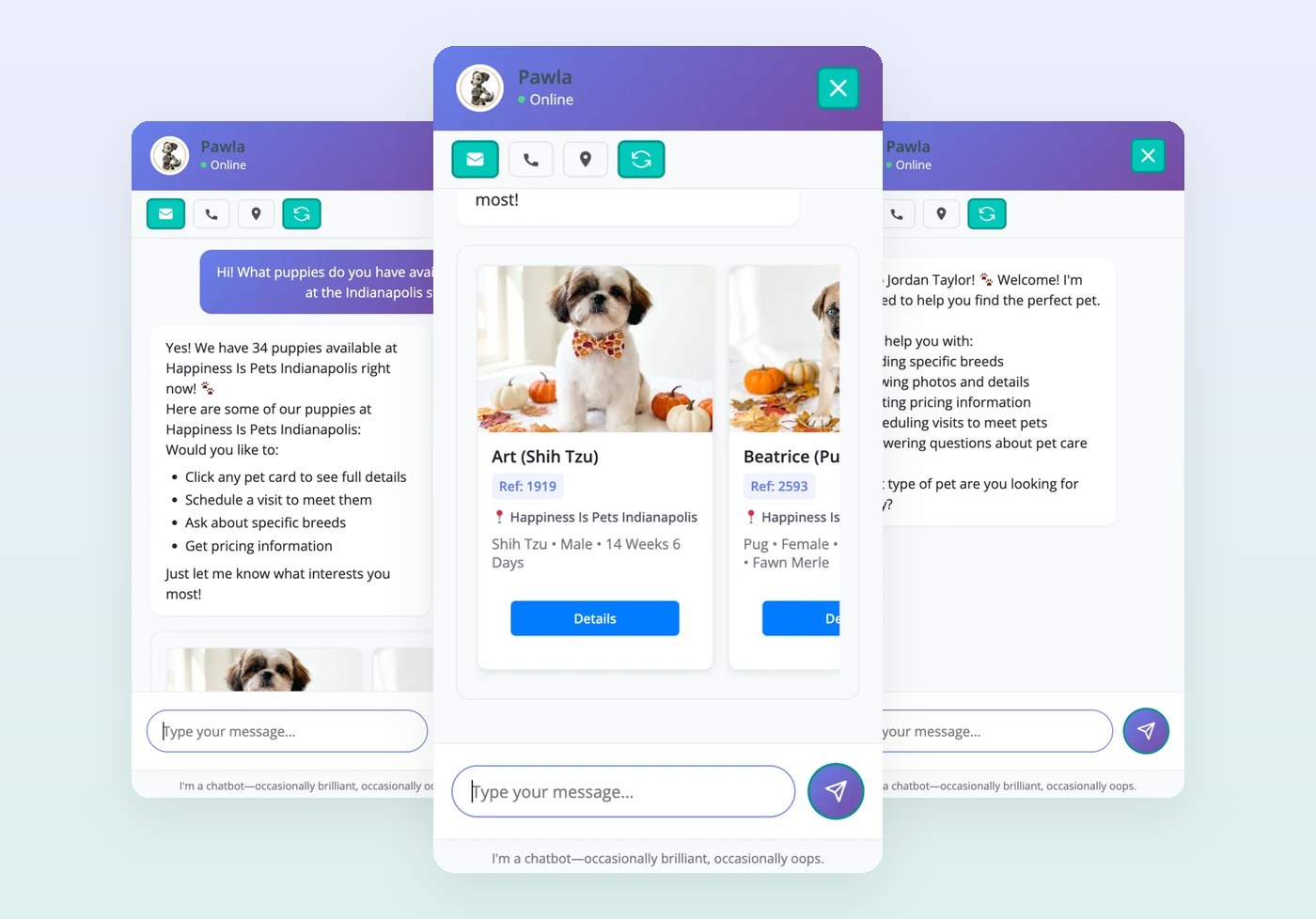
- contact fields before the first message
- 3
- pet details read from your inventory
- 9
- AI providers: OpenAI or Gemini
- 2
- minute lead hold so the AI summary rides along
- 30
One plugin replaces
- Generic chat widget
- Contact form
- Availability phone calls
- After hours voicemail
- Manual lead emails
- Separate site search
Inside AI Chatbot
A conversation that
starts with your business.
The training boundary is deliberate: your own materials and website content inform the chatbot’s responses.
Shopper side
Settings
Bot setup
Appearance
 (view larger)
Shopper side / Live on your site
A sales associate that never clocks out.
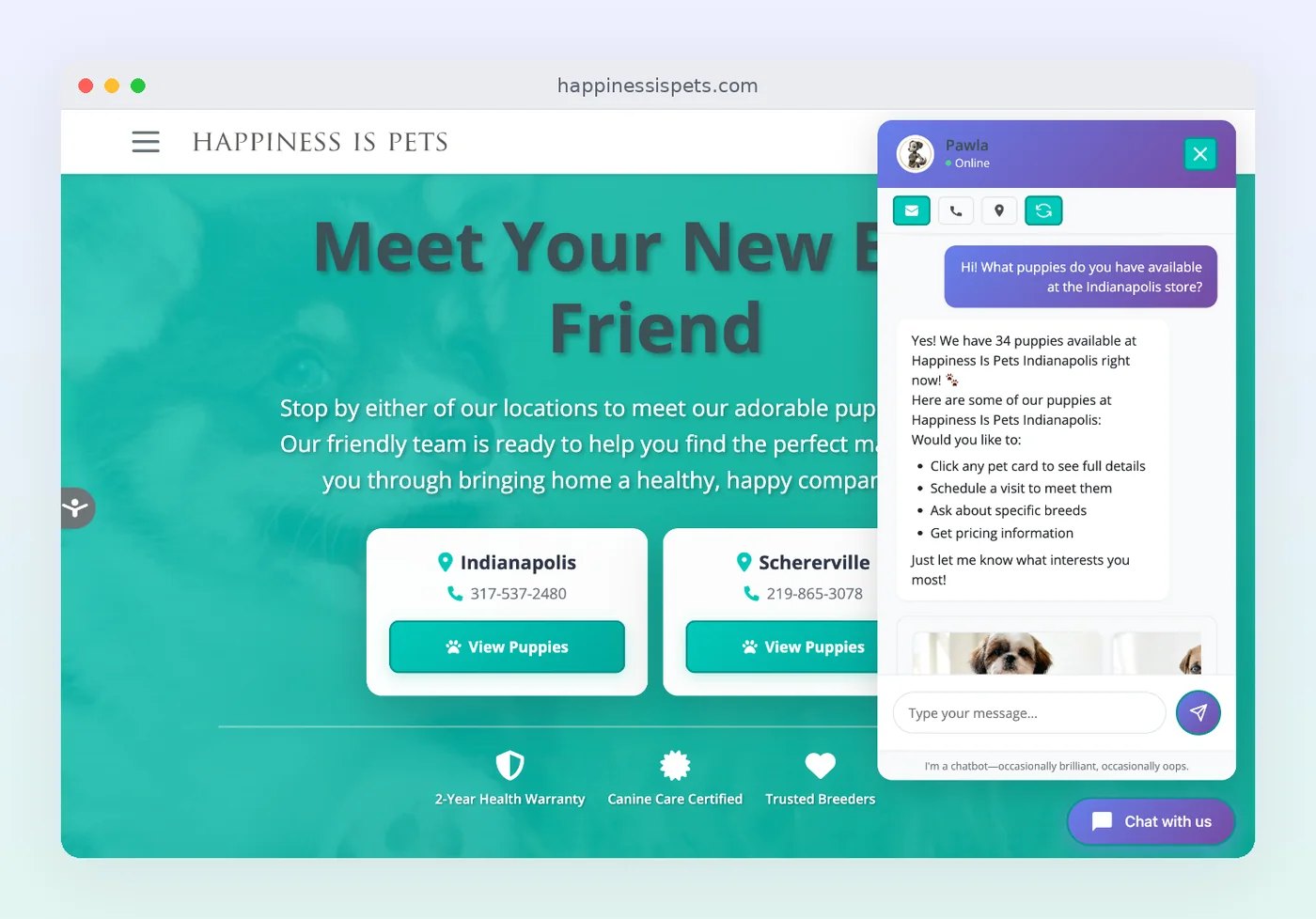
The chat button sits on every page. Here the bot, named Pawla, answers a question about puppies at one of the store's two locations with a live count and pet cards.
- Floating chat button site wide
- Store specific answers
- Quick email, call, directions and restart buttons
- Runs on your own WordPress site
 (view larger)
Shopper side / Intake form
Every conversation starts as a lead.
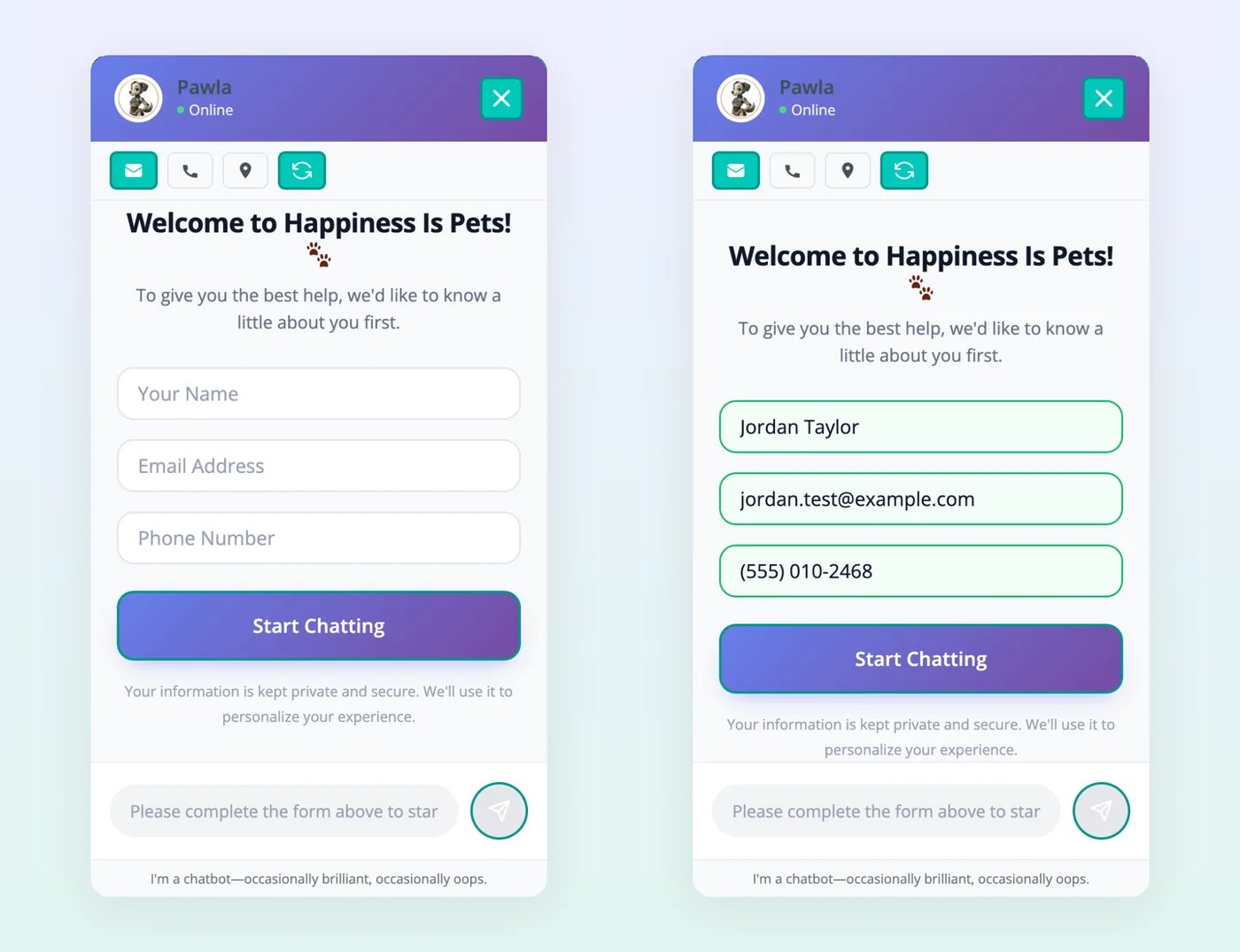
The welcome screen asks for name, email and phone before chat opens. Fields turn green as they pass validation and the phone number formats itself.
- Name, email and phone up front
- Live field validation
- Custom heading, labels and privacy note
- Optional consent checkbox
 (view larger)
Shopper side / Greeting and inventory
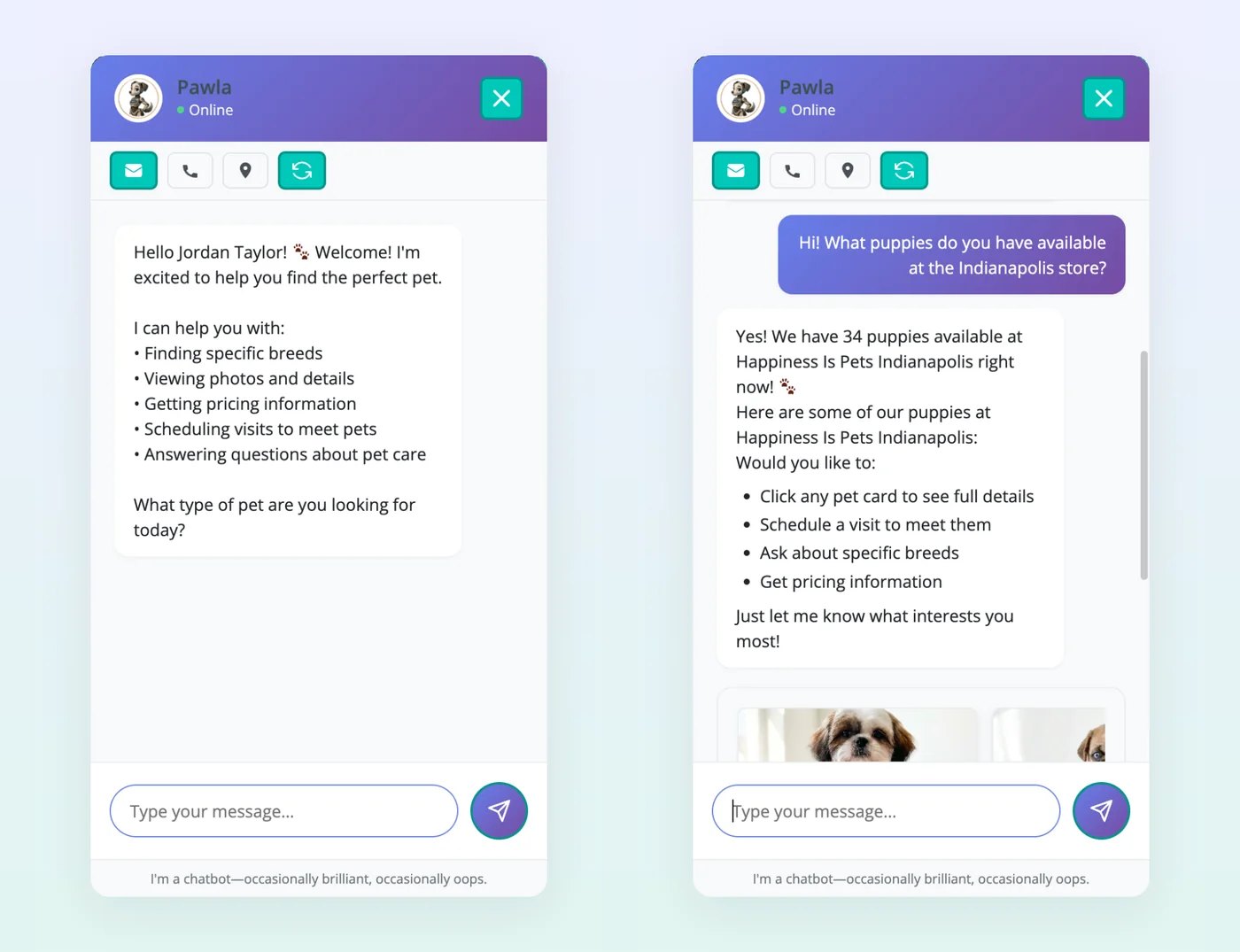
Personal from the first line.
The bot greets the shopper by name and lays out what it can help with. Ask what is available at a store and it answers with a live count for that location.
- Greets the shopper by name
- Live inventory counts per store
- Pet cards right in the reply
- Suggested next steps
 (view larger)
Shopper side / Pet cards and lookup
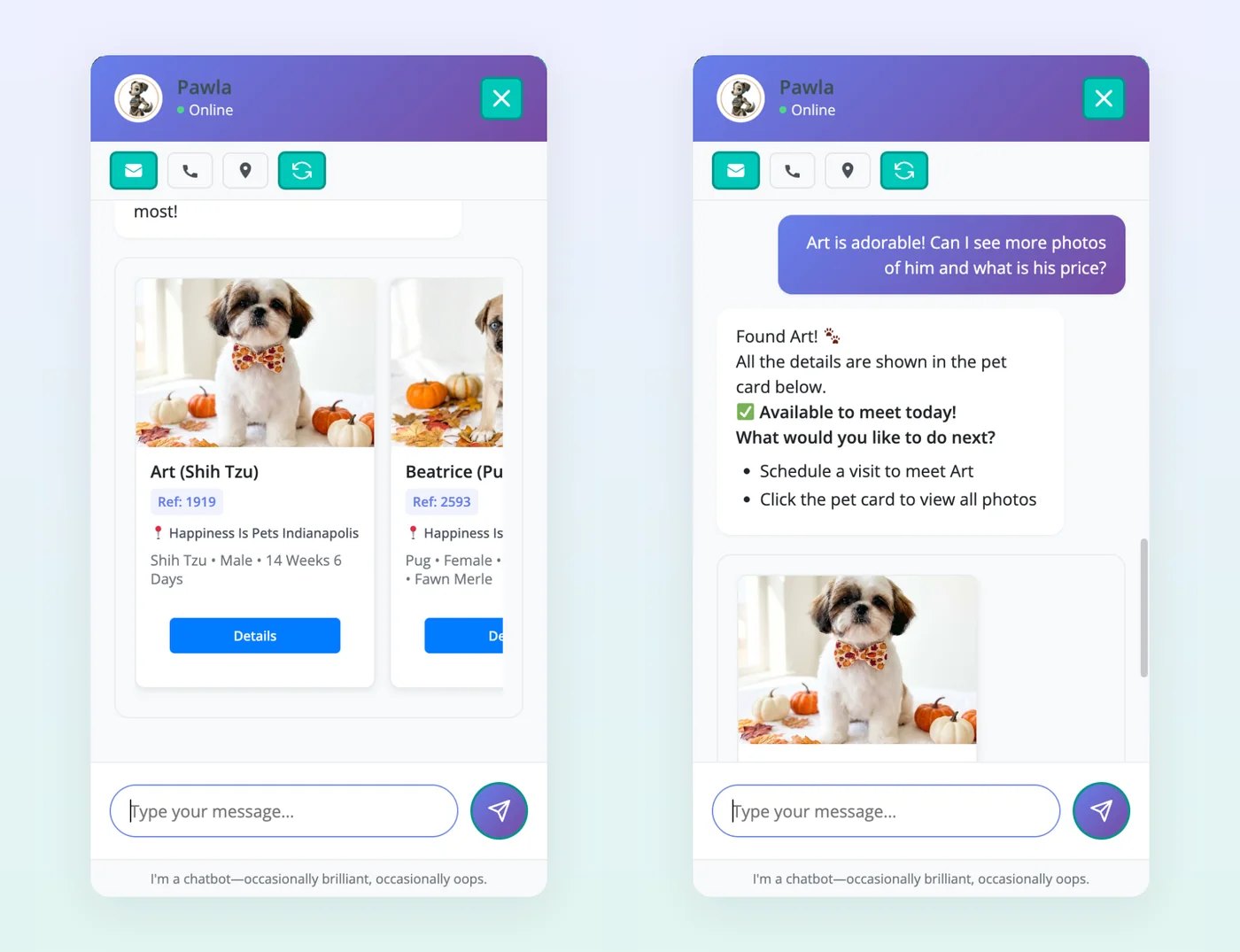
Every puppy, one swipe away.
Swipeable cards show photo, reference number, store, breed, gender and age in weeks and days. Ask about a pet by name and the bot finds it and confirms it can be met today.
- Photo, reference number and store
- Breed, gender and age
- Find any pet by name
- Invites the shopper to schedule a visit
 (view larger)
Shopper side / Care answers and coming soon
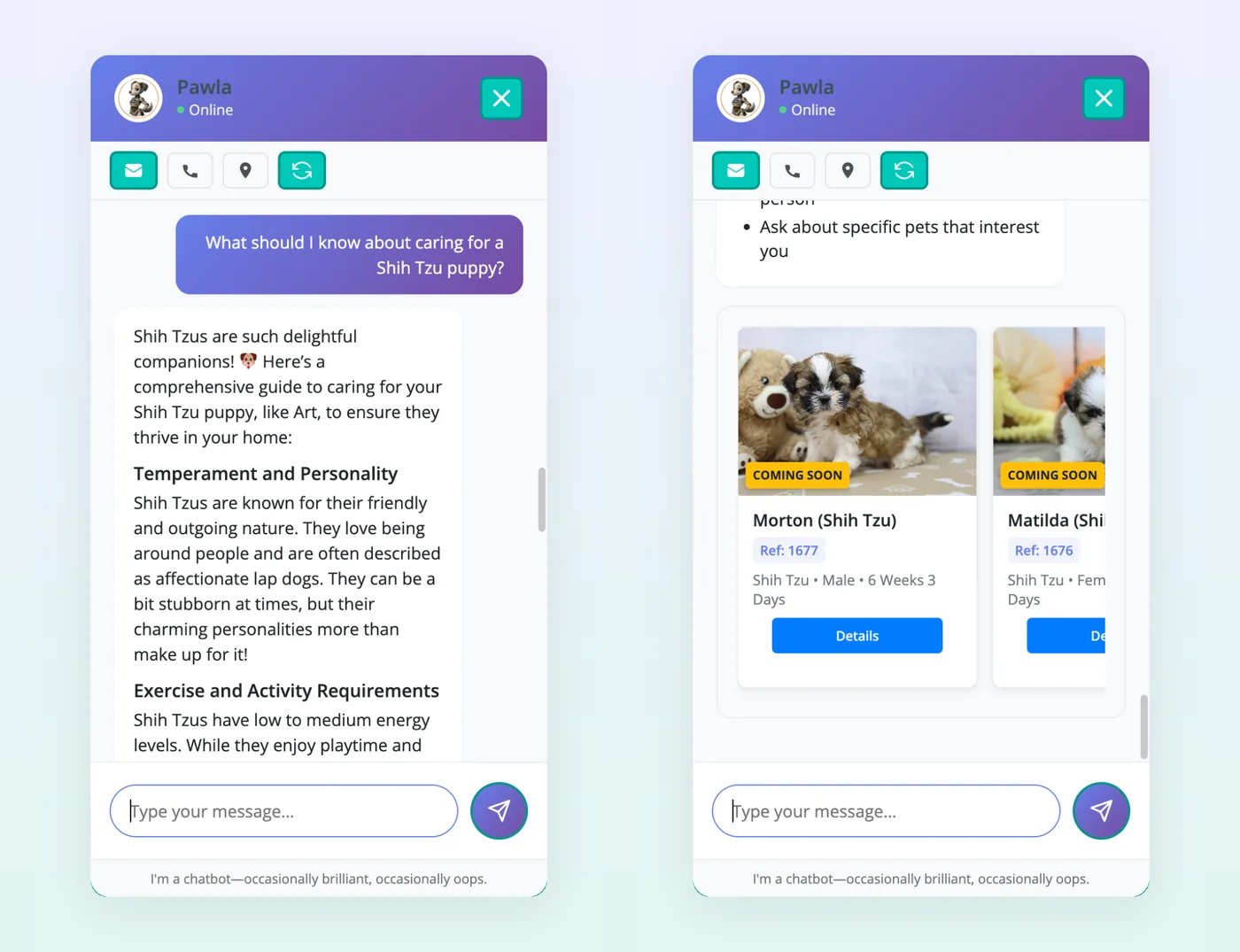
Answers that keep the interest going.
Breed care questions get structured answers tied back to the pet the shopper liked. Pets not yet on the floor show a Coming Soon badge.
- Headed care guides by breed
- Tied back to the pet in the chat
- Coming Soon badges
- Keeps the conversation moving toward a visit
 (view larger)
Settings / General
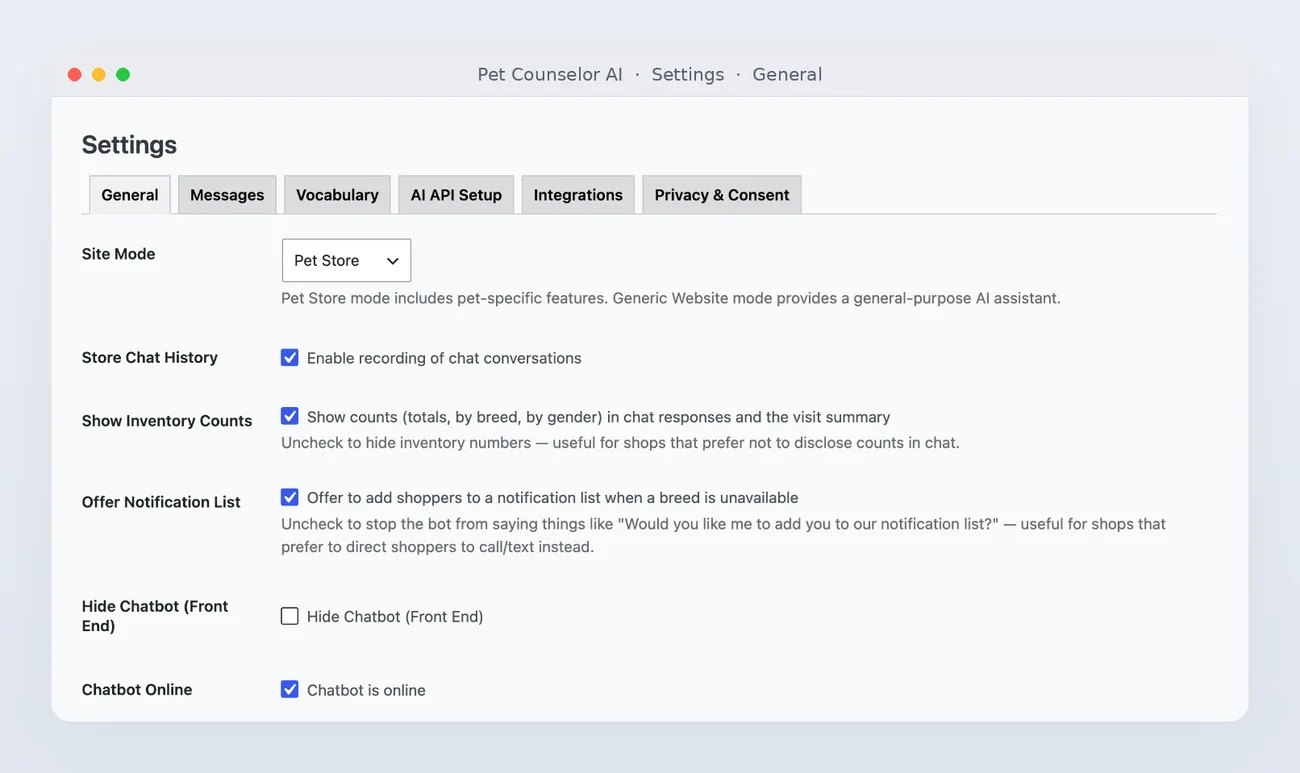
The switches that shape the bot.
Choose Pet Store or Generic Website mode, record chat history, show or hide inventory counts and control when the bot is online.
- Pet Store or Generic Website mode
- Inventory counts on or off
- Notification list for unavailable breeds
- Online toggle, business hours and offline form
 (view larger)
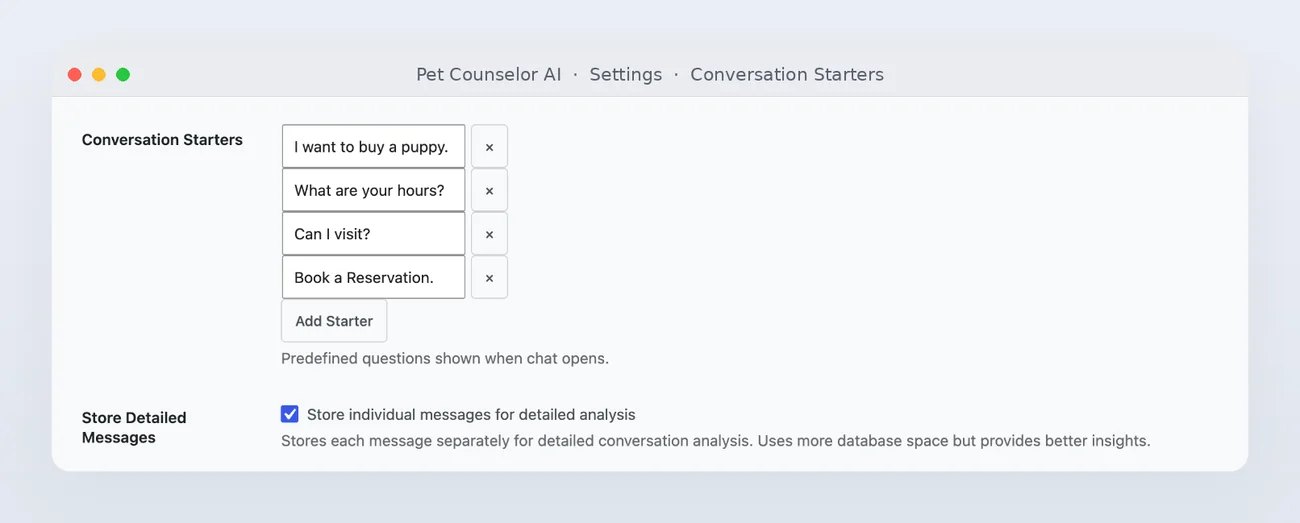
Settings / Conversation starters
Give shoppers an easy first tap.
Preset questions appear when the chat opens, so a shopper can start with one tap.
- Unlimited starters
- Store each message for analysis
- Session timeout control
 (view larger)
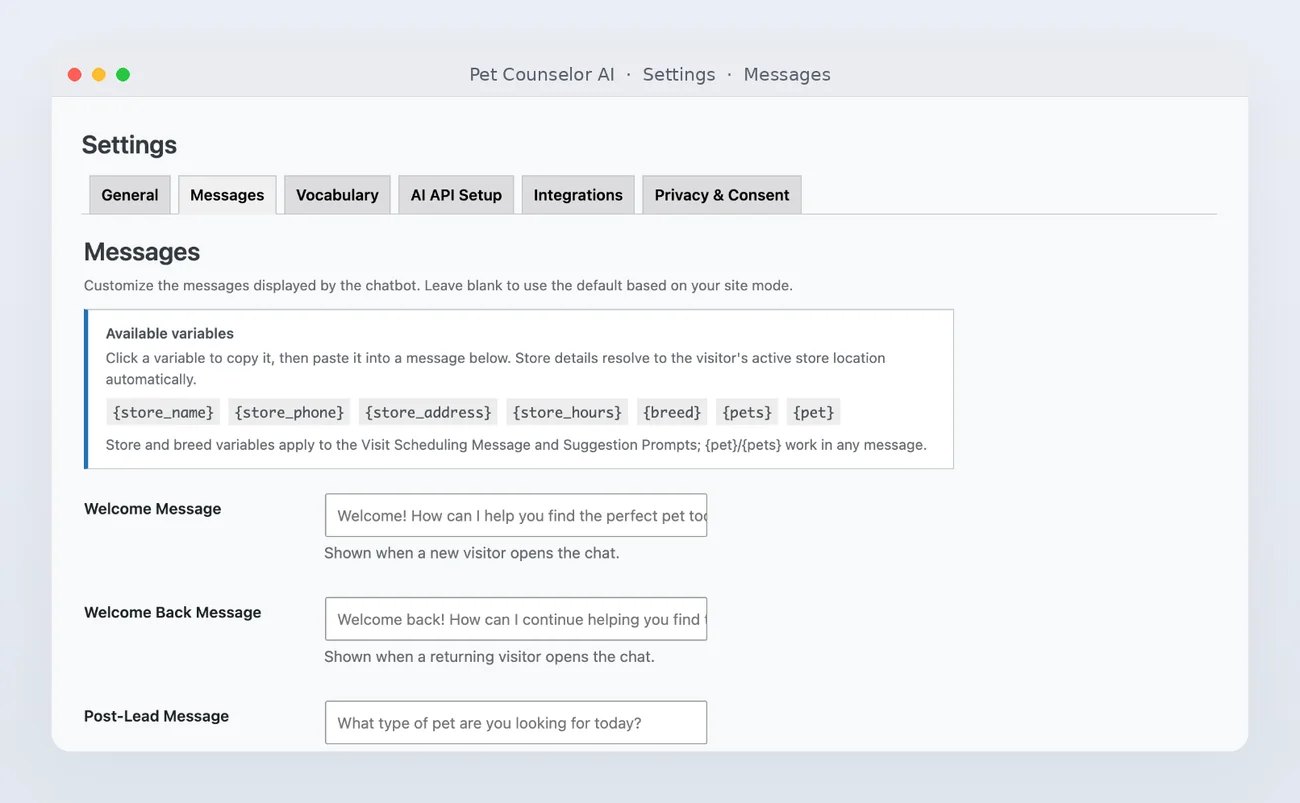
Settings / Messages
Every line the bot says on its own.
Edit the welcome, welcome back and post lead messages. Click to copy store and pet variables that fill in from the shopper's active store. Blank fields fall back to smart defaults.
- Welcome and welcome back messages
- Post lead message
- Store name, phone, address and hours variables
- Breed and pet variables
 (view larger)
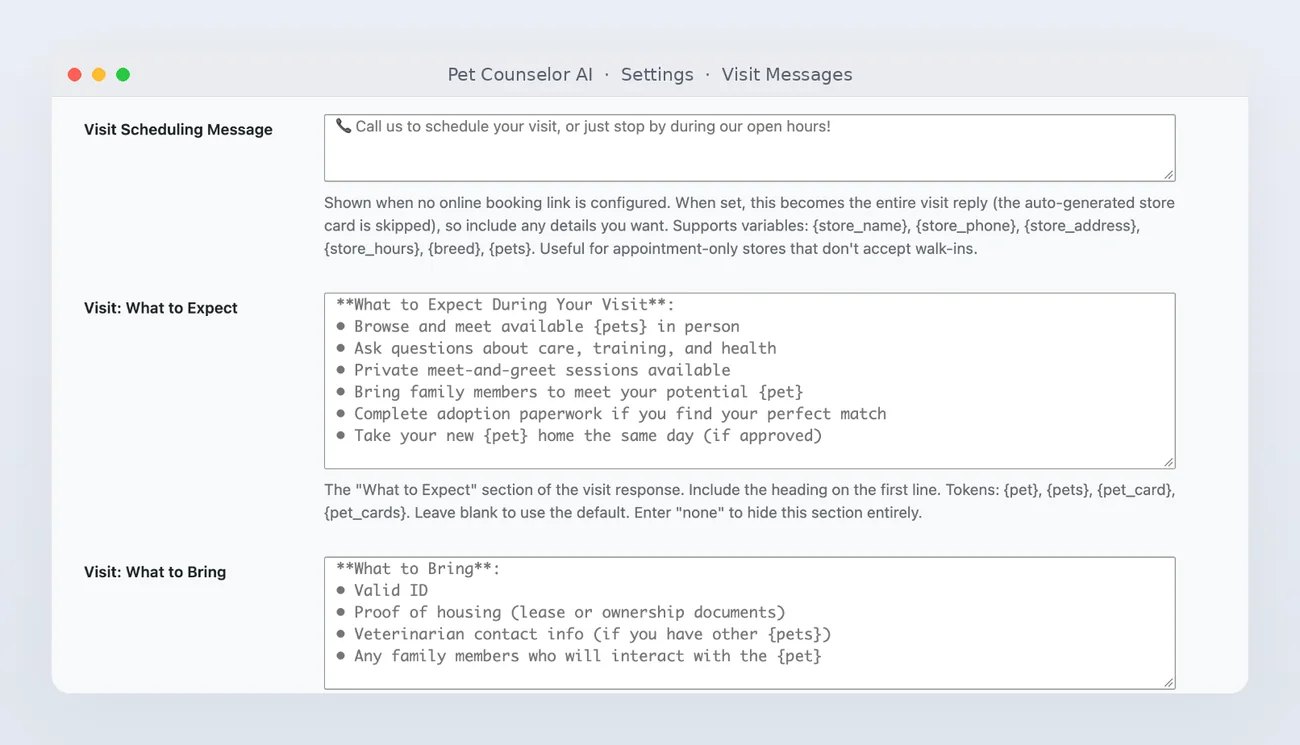
Settings / Visit messages
Turn interest into a visit.
Write what the bot says when someone wants to come in, including what to expect and what to bring. Enter none to hide a section.
- Visit scheduling message
- What to Expect section
- What to Bring section
- Works for appointment only stores
 (view larger)
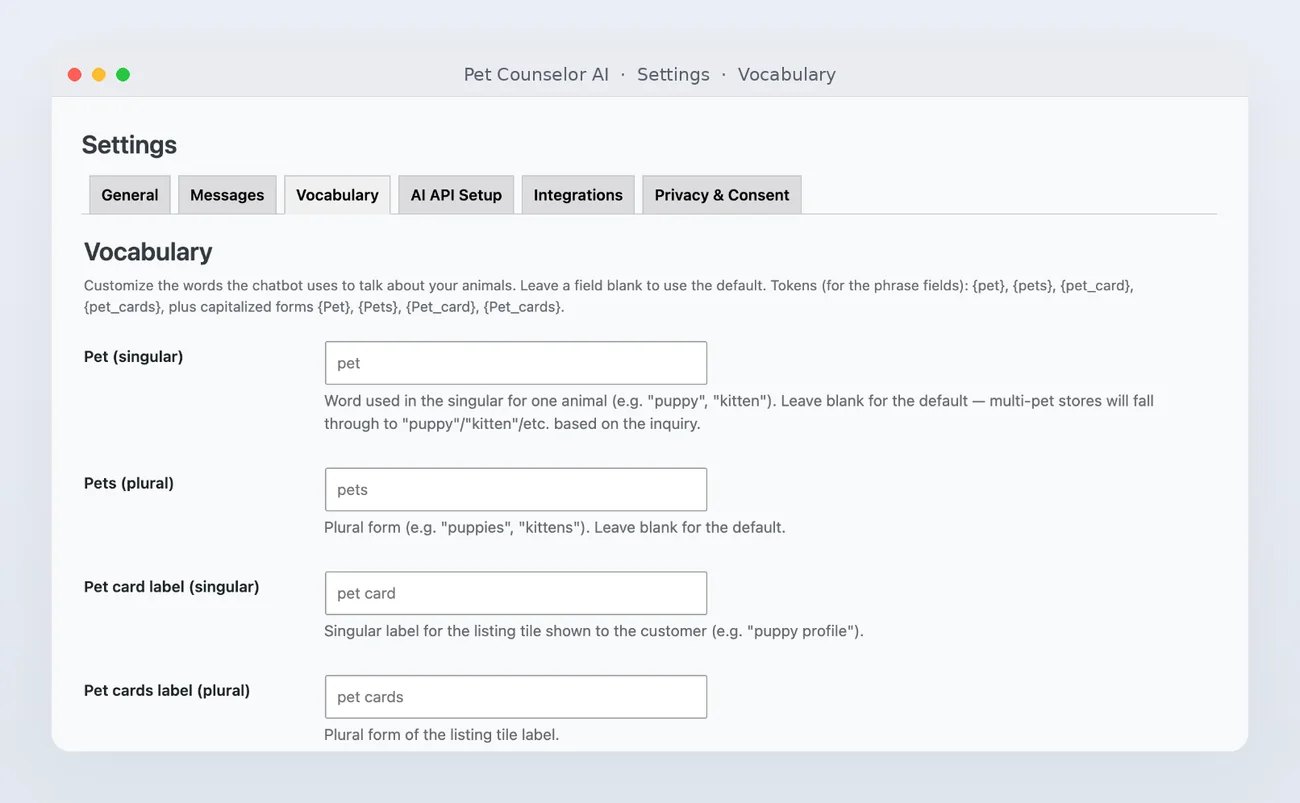
Settings / Vocabulary
Speak the way your store speaks.
Change the words the bot uses for your animals, so a puppy store says puppy and a cattery says kitten.
- Singular and plural pet names
- Pet card labels
- Calls to action
- Not found wording
 (view larger)
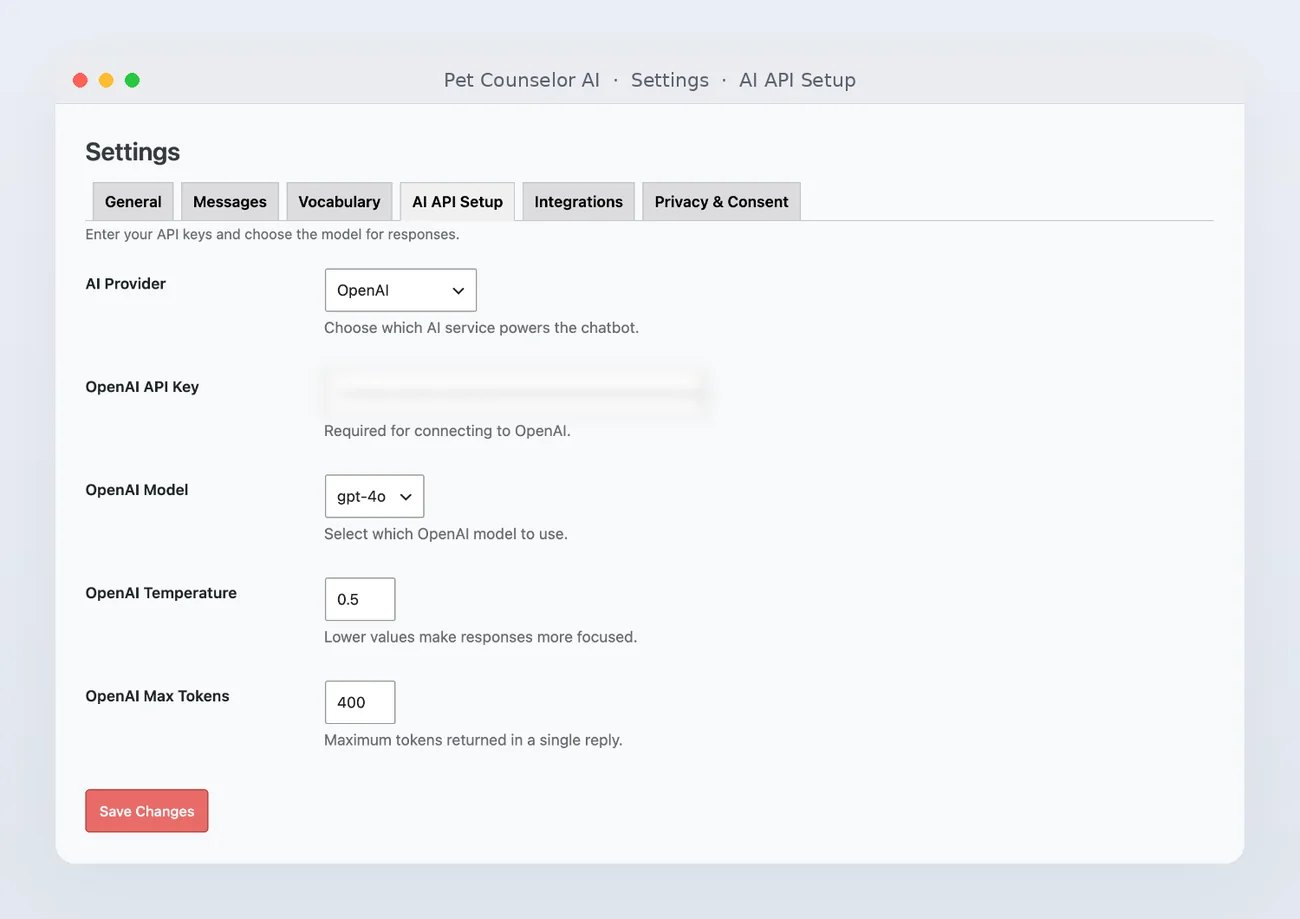
Settings / AI provider
Your AI, your key.
Choose OpenAI or Gemini, pick the model and tune how focused and how long replies are. The API key is stored in WordPress and masked.
- OpenAI or Google Gemini
- Model selection
- Temperature and max tokens
- Key hidden from shoppers
 (view larger)
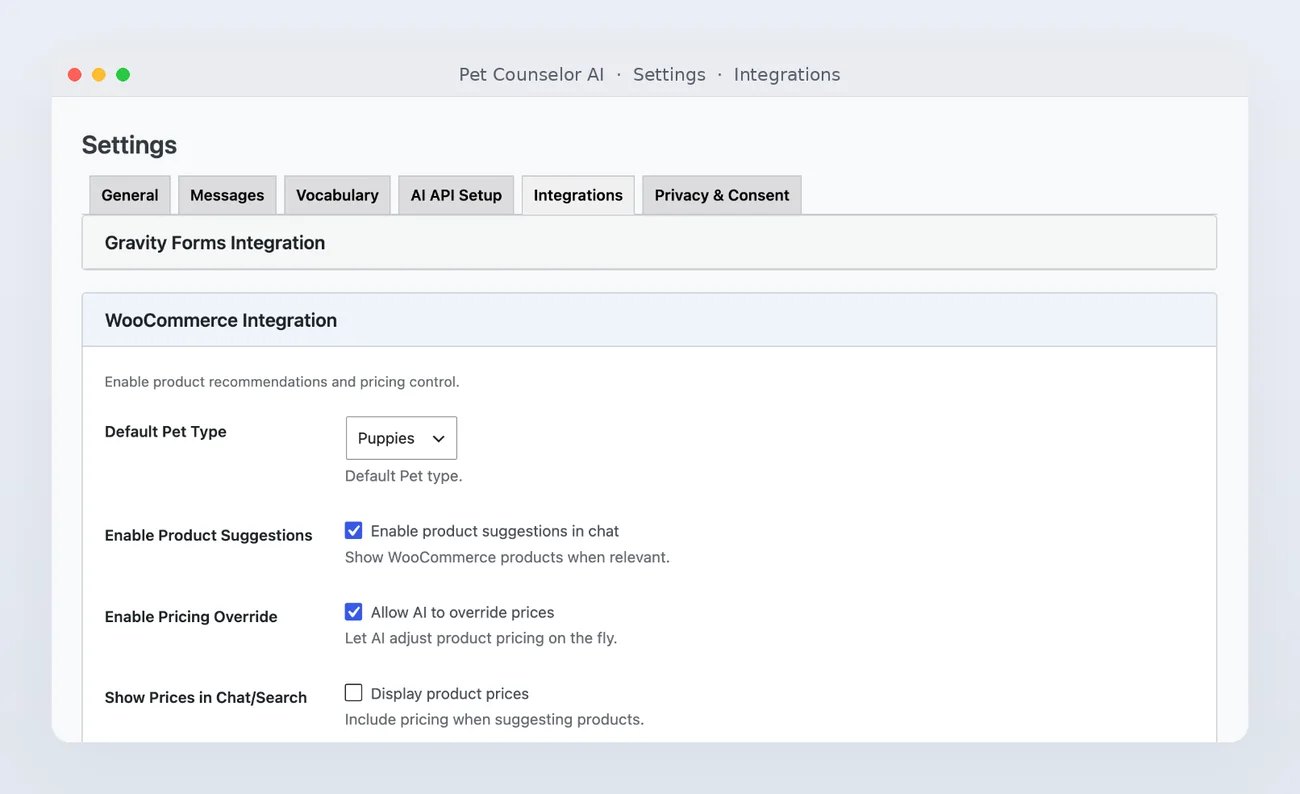
Settings / WooCommerce
Reads your catalog.
Set the default pet type, turn product suggestions on and decide whether prices show in chat.
- Default pet type
- Product suggestions in chat
- Price display controls
- Pet types and categories
 (view larger)
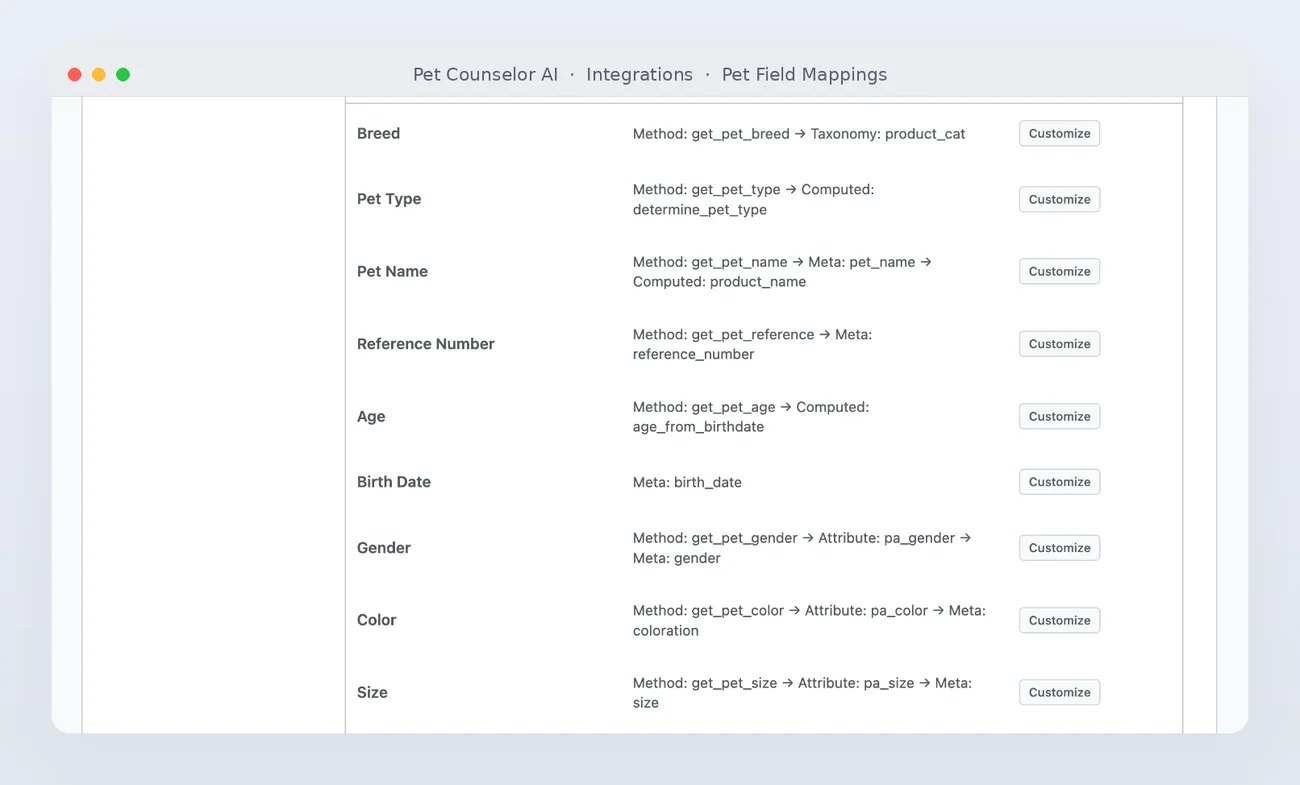
Settings / Pet field mapping
Works with how your inventory is built.
Each pet attribute has a source chain the bot walks in order. UKM Pet Sync is detected automatically and every row can be customized.
- Breed, type, name and reference number
- Age from birth date
- Gender, color and size
- Reset or auto detect
 (view larger)
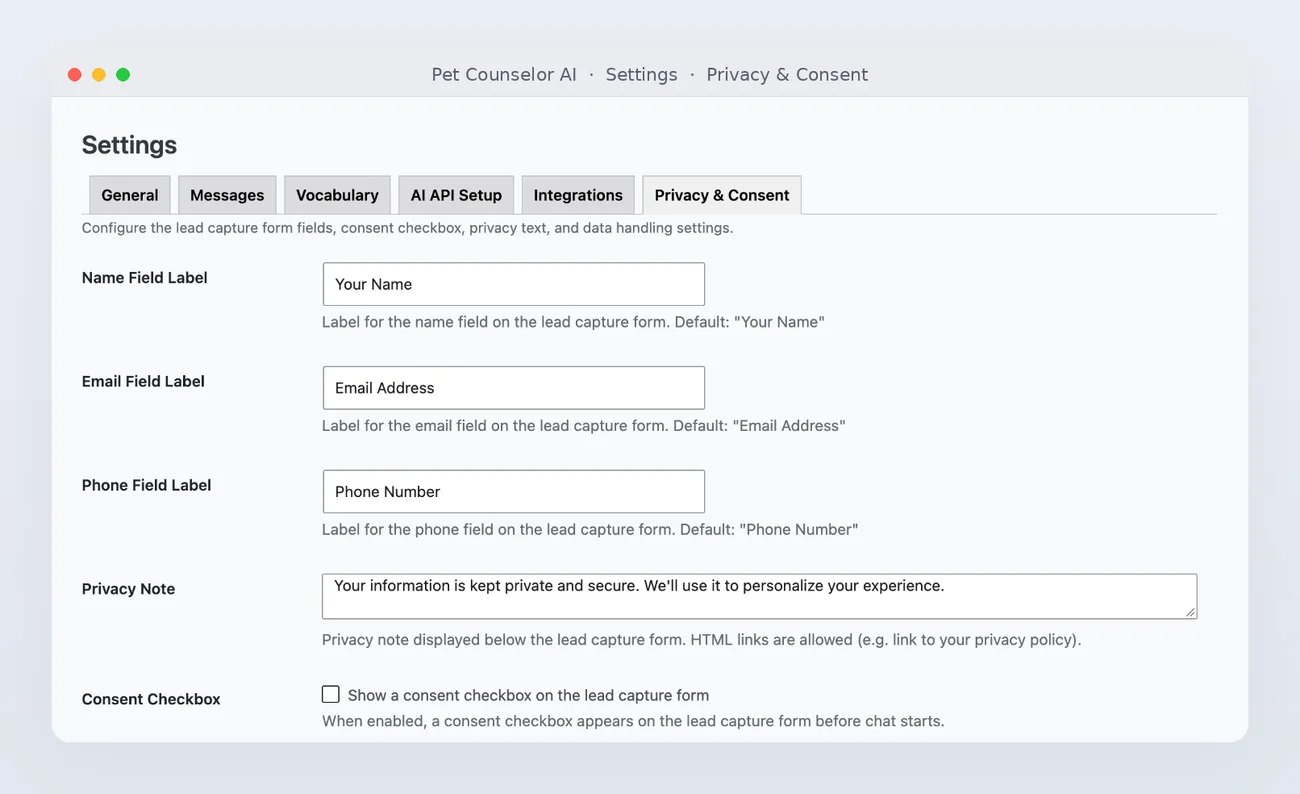
Settings / Privacy and consent
Collect leads the right way.
Set the intake form labels and privacy note, add an optional consent checkbox and control data handling.
- Field labels
- Privacy note with links
- Consent checkbox
- IP anonymizing
 (view larger)
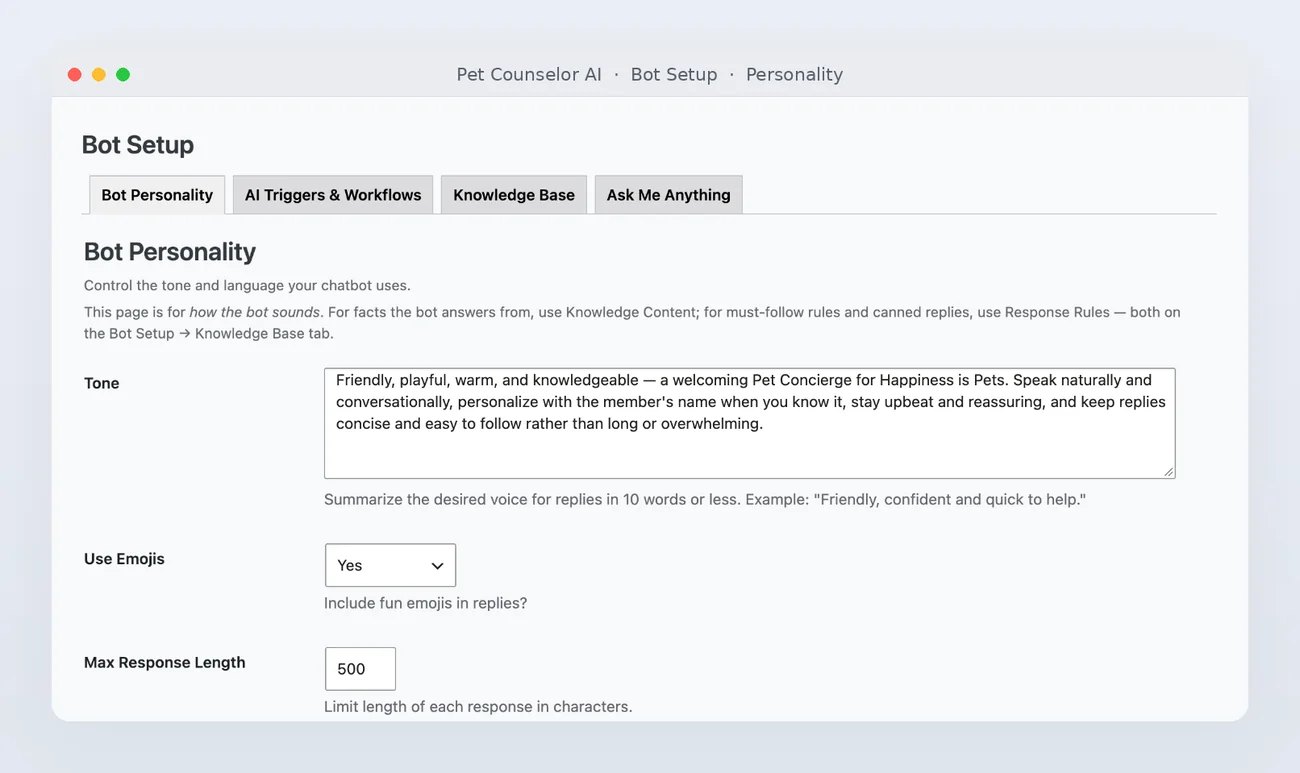
Bot setup / Personality
Sounds like your store.
Describe the tone, choose whether to use emojis and cap reply length. Facts and rules live in the knowledge base, so voice and content stay separate.
- Tone description
- Emojis on or off
- Max response length
- Bot name, language and profile image
 (view larger)
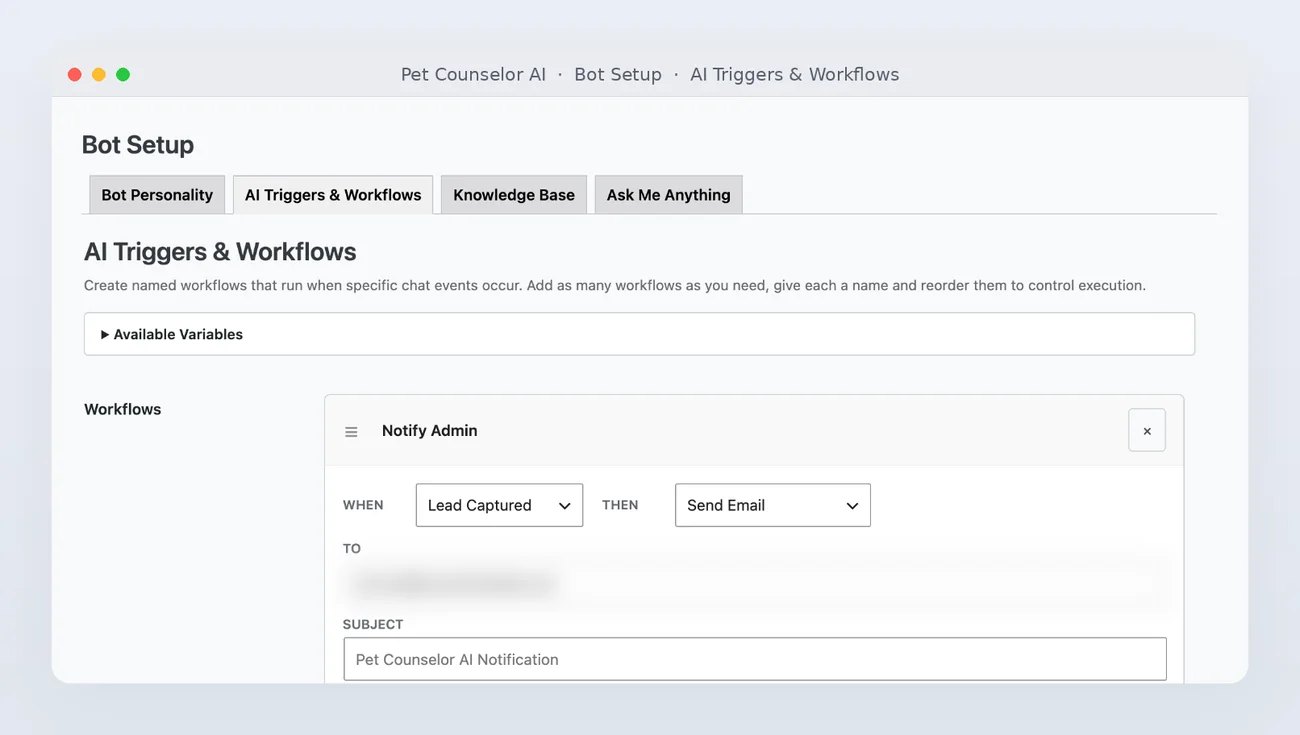
Bot setup / Triggers and workflows
Act the moment a lead arrives.
Named workflows run when chat events happen. Add as many as you need and drag to reorder them.
- When Lead Captured and other events
- Then Send Email and other actions
- Recipient, subject and message
- Name, email and phone variables
 (view larger)
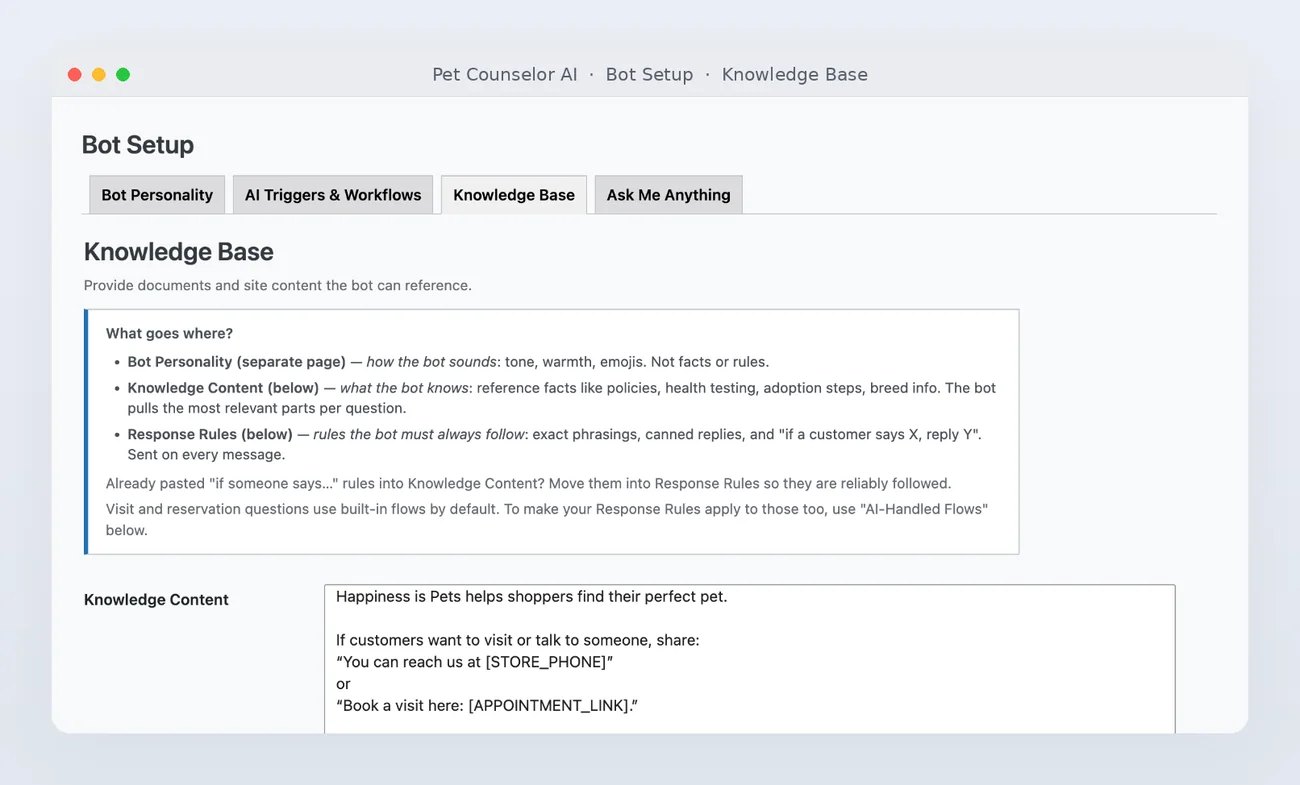
Bot setup / Knowledge base
What the bot knows, kept separate from how it sounds.
Knowledge content holds policies and breed info. Response rules hold exact wording the bot must always follow.
- Knowledge content
- Response rules
- AI handled visit flows
- Breed page links
 (view larger)
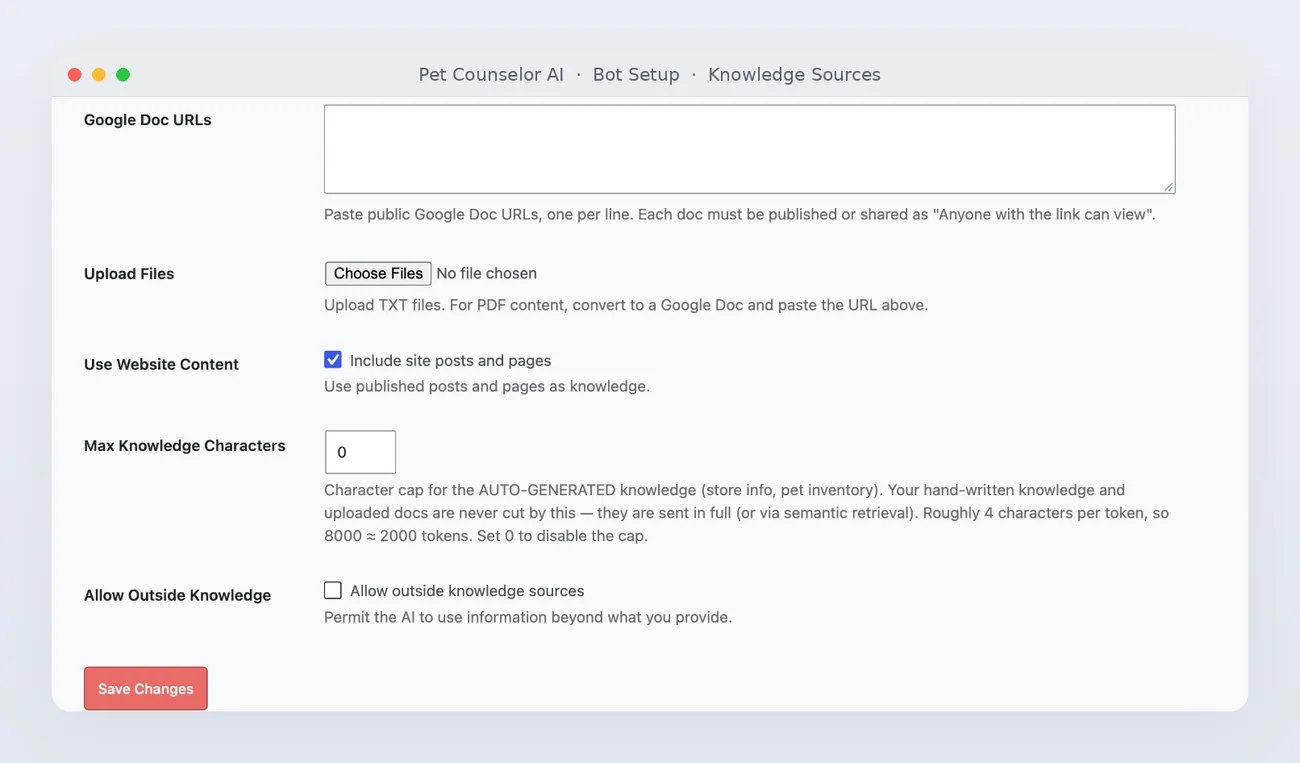
Bot setup / Knowledge sources
Teach it from what you already have.
Add public Google Docs, upload TXT files and include your site's posts and pages. Turn outside knowledge off to keep answers limited to what you provide.
- Public Google Doc URLs
- TXT file uploads
- Site posts and pages
- Outside knowledge on or off
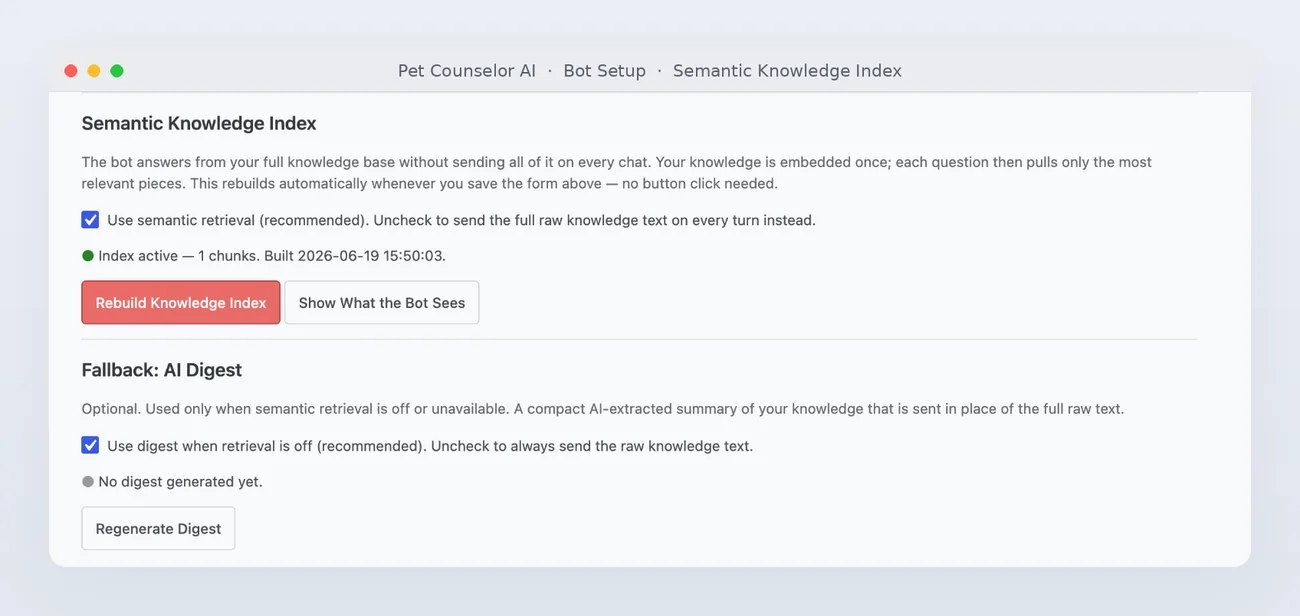 (view larger)
Bot setup / Semantic index
Fast answers at a lower cost.
Knowledge is embedded once, then each question pulls only the relevant pieces. Preview exactly what the bot sees.
- Semantic retrieval
- Automatic rebuild on save
- Show What the Bot Sees
- AI digest fallback
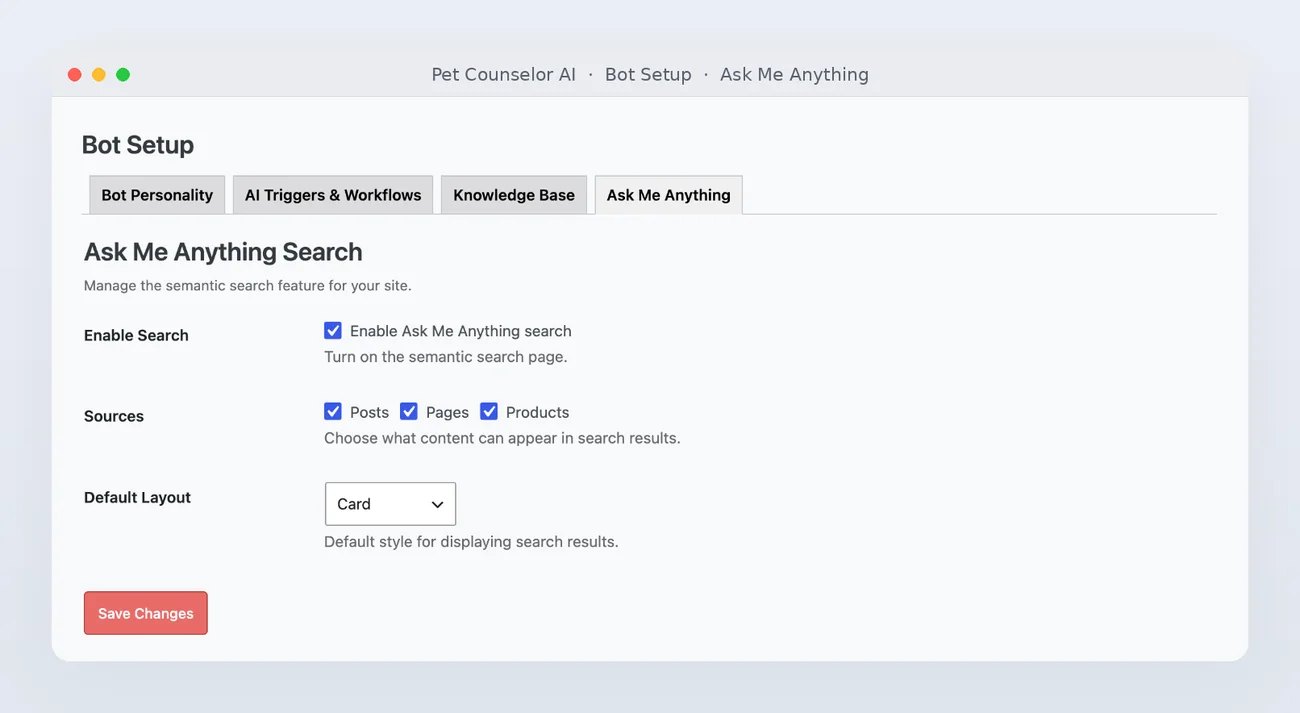 (view larger)
Bot setup / Ask Me Anything
Semantic search for the whole site.
Turn on a search page that understands questions, across posts, pages and products.
- Posts, pages and products
- Card layout
- On or off in one click
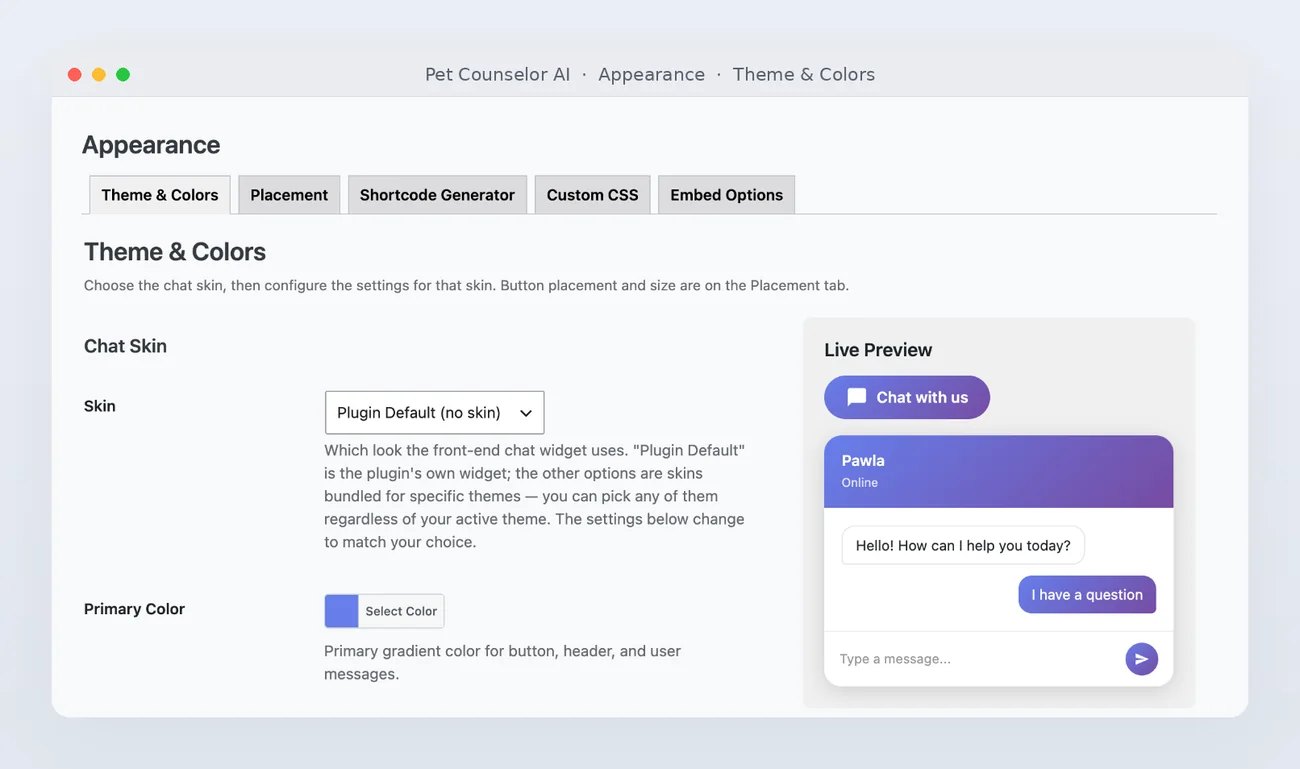 (view larger)
Appearance / Theme and colors
Fits any theme.
Pick a skin and brand colors and watch the live preview update before you save.
- Plugin default or theme skins
- Primary and secondary colors
- Message colors and border radius
- Live preview
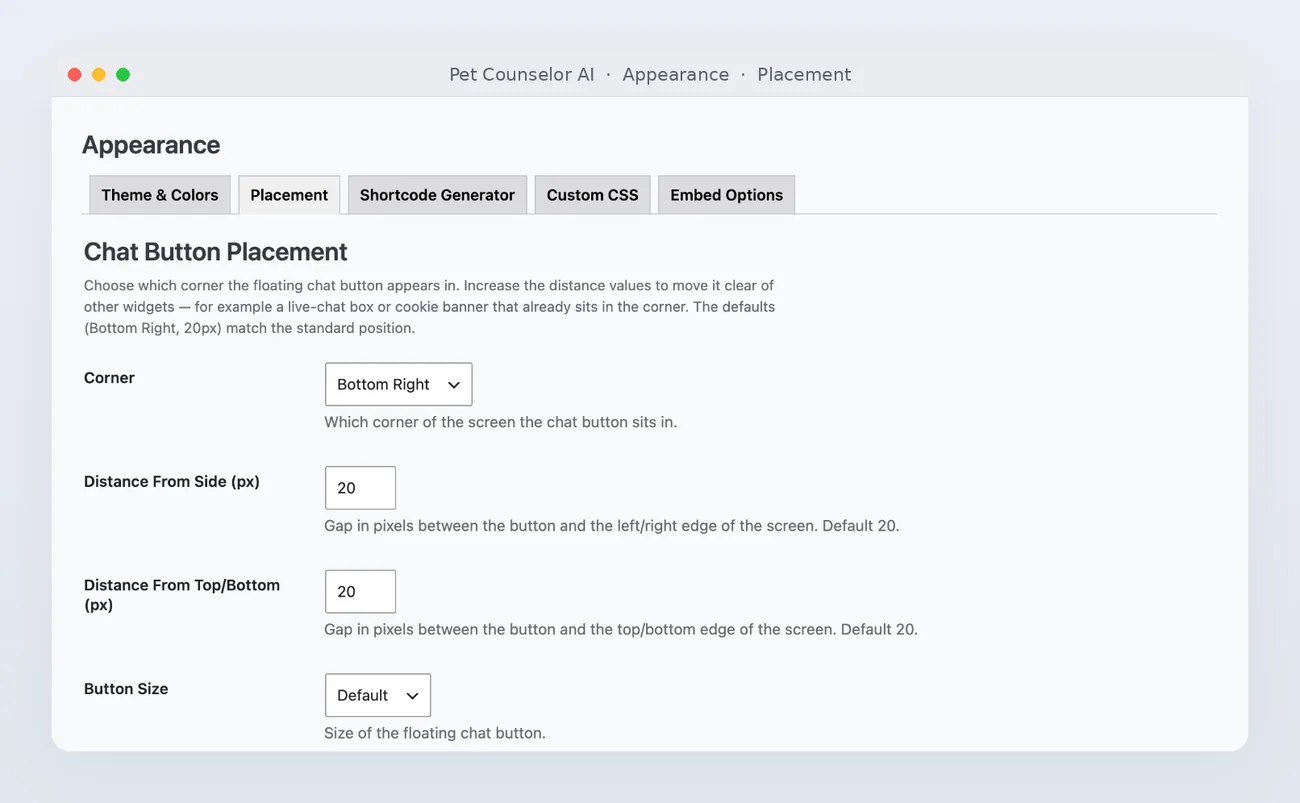 (view larger)
Appearance / Placement
Never collides with another widget.
Choose the corner and spacing so the chat button clears cookie banners and other widgets.
- Corner choice
- Distance from side and edge
- Button size
 (view larger)
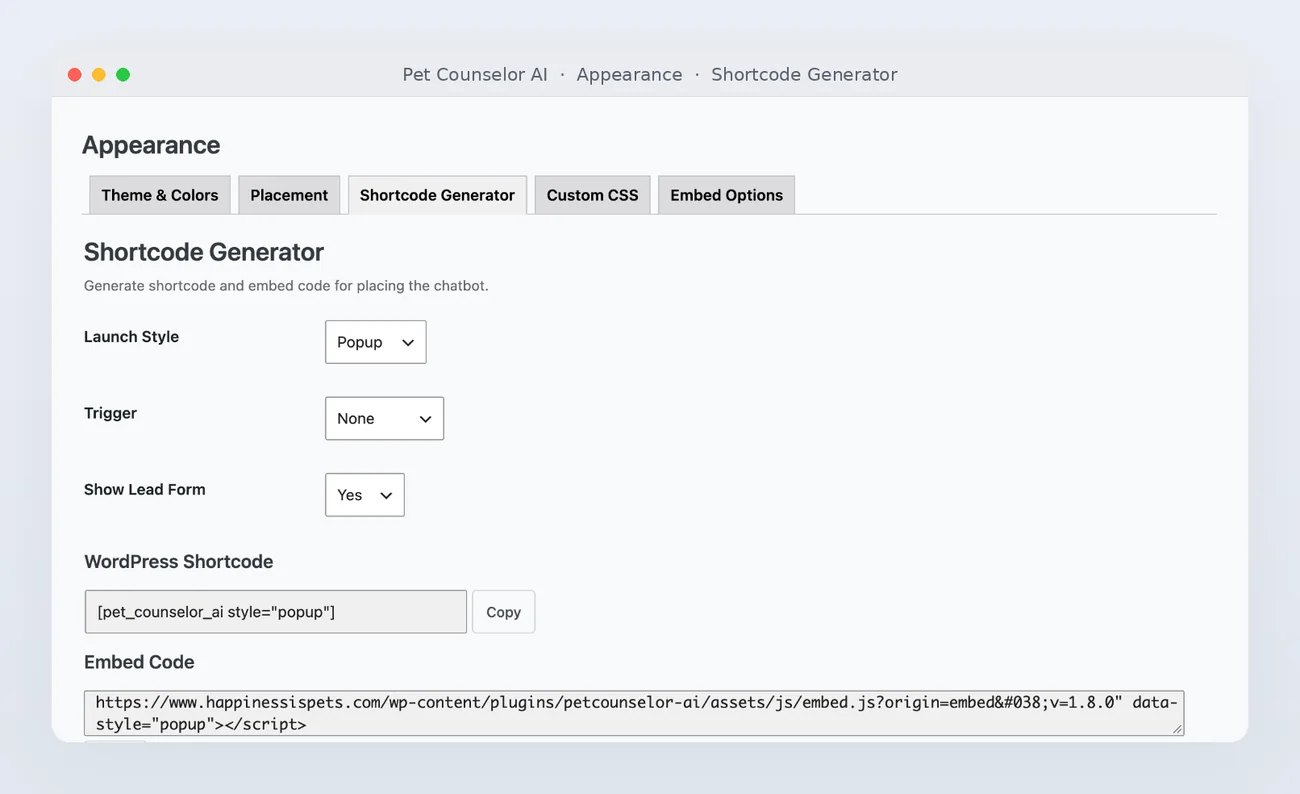
Appearance / Shortcode and embed
Put it anywhere.
Build a shortcode or embed script with the launch style, trigger and lead form you want.
- Popup or inline launch
- Optional trigger
- Lead form on or off
- Shortcode or embed script
Under the hood
The details that close more leads.
The rules, safeguards and smarts that make AI Chatbot more than a contact list.
-
Reads the real kennel
Breed, age, gender, color, size, photos and reference numbers pulled from WooCommerce or UKM Pet Sync, with field mapping detected automatically.
-
Contact details first
An up front form captures name, email and phone. Leads post to Gravity Forms after a delay so the AI conversation summary is attached.
-
Knows which store
Multi location stores get per store phone, address, hours and booking links, and message variables resolve to the shopper's active store.
-
Turns interest into a visit
Visit replies include what to expect and what to bring, written per store, and appointment requests can be captured right in the chat.
-
Answers from your facts
Knowledge content, response rules, breed page links, public Google Docs, TXT uploads and site pages feed a semantic index.
-
Sounds like the store
Tone, emoji use, response length, language and bot name are set by the store. A vocabulary tab swaps pet for puppy or kitten.
-
Workflows on chat events
Named, reorderable workflows run on events such as Lead Captured, like emailing staff the moment a shopper starts chatting.
-
Online when you are
A business hours schedule can take the bot offline after close, with an offline form and after hours message in its place.
-
Fits any theme
Skins, brand colors, corner placement, button size, custom CSS and a live preview. Place it with a shortcode or an embed script.
How it works
From hello to the store's inbox.
-
Intake
The shopper enters name, email and phone in the chat window. Fields validate as they type and the phone number formats itself.
-
Lead stored
The lead is saved to the plugin's own tables in your WordPress database right away, before a single question is answered.
-
Workflows fire
Lead Captured workflows run, such as emailing the store team the shopper's details the moment they start chatting.
-
Conversation
The bot answers from your knowledge and live inventory, shows pet cards and steers the shopper toward a visit.
-
Form submission
After a configurable delay, 30 minutes by default, the lead and an AI summary of the chat post to Gravity Forms.
Integrations
Works with the tools you already use.
The AI Chatbot reads your inventory where it already lives, writes replies with the AI provider you choose and hands every lead to the forms and CRM your team already uses.
Inventory
- WooCommerce Pets and products read straight from your catalog
- UKM Pet Sync Detected automatically with field mapping built in
Leads
- Gravity Forms Chat leads post to a mapped form with the AI summary
CRM
- Groundhogg Optional: send leads to the CRM with tags
AI
- OpenAI Replies written by the OpenAI model you choose
- Google Gemini Use Gemini as the AI provider instead
Knowledge
- Google Docs Public docs become part of what the bot knows
- WordPress content Published posts and pages feed the knowledge index
Workflows
- WordPress mail Workflow emails send through your site
Placement
- Embed script Place the chat on a page or on another site
Compare
AI Chatbot vs. a generic chat widget.
Most chat widgets answer from a script and a support inbox. The AI Chatbot is built around how pet stores actually sell: live pets, real store details and a visit at the end of the conversation.
| AI Chatbot | Generic chat widgets | |
|---|---|---|
| Knows what is in the store | Yes. Reads live pets from WooCommerce or UKM Pet Sync | No. Answers from a static FAQ |
| Lead capture | Yes. Name, email and phone before the first message | No. Optional, often skipped |
| Multiple locations | Yes. Per store phone, address, hours and booking links | No. One generic answer for every store |
| Where answers come from | Yes. Your knowledge, response rules and site content | No. Canned scripts or general training |
| Where it runs | Yes. Inside your WordPress admin | No. A separate vendor dashboard |
| AI usage costs | Yes. Your own OpenAI or Gemini key, no markup from us | No. Often priced by conversation or credits |
| After the chat | Yes. Workflows, Gravity Forms and CRM handoff with an AI summary | No. A transcript in someone's inbox |
Comparison reflects a typical hosted chat widget. Features vary by vendor.
Product details
About AI Chatbot.
An AI chatbot for pet stores that knows every pet on the floor
Shoppers ask the same questions all day. What puppies do you have? How old is he? Can I come see her today? Our AI Chatbot answers those questions the way your best associate would, any time of day.
Cosmick Media, Inc. built it from the ground up for pet stores on WordPress and WooCommerce. It reads your live inventory, answers from your own store knowledge and speaks in your store’s voice. Best of all, it captures the shopper’s name, email and phone before the first message, so every conversation becomes a lead.
What it does for your store
- Shows real pets. Live counts and swipeable pet cards come straight from WooCommerce or UKM Pet Sync.
- Captures every lead. Name, email and phone come first, then workflows alert your team right away.
- Knows each location. Phone, address, hours and booking links match the store the shopper is asking about.
- Books the visit. Replies explain what to expect and what to bring, so shoppers walk in ready.
- Stays on script. Answers come from your knowledge base and response rules, not guesswork.
Everything runs inside your WordPress admin. You choose OpenAI or Google Gemini, use your own API key and pay no markup from us. Then you control the name, tone, colors and hours from one settings area.
Who it is for
Built for teams that live on inquiries.
-
Retail pet stores
Answer "what puppies do you have?" at any hour with live inventory, then capture the shopper and invite them in.
-
Multi location pet stores
Each shopper gets the right store's phone, address, hours and booking link, so nobody drives to the wrong location.
-
Appointment only stores
Visit messages explain how to book, what to expect and what to bring, so shoppers arrive ready.
-
Any WordPress business
Generic Website mode turns the same engine into an AI assistant trained on your own content and rules.
Security and control
Your customers. Your server. Your rules.
AI Chatbot runs inside the WordPress site you already own and protect, so the people, permissions and data stay with you.
-
Leads stay in your database
Every lead and conversation is stored in the plugin's own tables on your WordPress site.
-
Answers from your facts
Turn outside knowledge off and the bot answers only from the knowledge, rules and content you provide.
-
Keys stay hidden
Your AI API key is stored in WordPress, masked in the admin and never shown to shoppers.
-
Privacy and consent tools
Add a privacy note with links, require a consent checkbox and anonymize visitor IPs.
-
Every conversation on record
Chat Sessions keep full conversation history for review and training.
-
Online when you are
Business hours can take the bot offline after close, with an offline form and after hours message in its place.
Questions
Common questions.
What is the AI Chatbot?
It is Cosmick Media's AI chat assistant for WordPress, listed as Pet Counselor AI in your admin. Pet Store mode reads live inventory, captures leads and books visits. Generic Website mode works as an AI assistant for any business.
Where does the chatbot get its answers?
From what you give it: knowledge content, response rules, breed page links, public Google Docs, TXT uploads, your site's posts and pages and your live inventory. Turn outside knowledge off and it stays limited to what you provide.
Does it know which pets are available?
Yes. It reads pets from WooCommerce or UKM Pet Sync, including breed, age, gender, color, size, photos and reference numbers. Pets not yet on the floor show a Coming Soon badge, and inventory counts can be hidden if you prefer.
How does it capture leads?
Shoppers enter name, email and phone before the chat opens. The lead is stored on your site right away, workflows can email your team instantly, and after a configurable delay the lead and an AI summary post to Gravity Forms. Groundhogg is supported too.
Can it handle more than one store?
Yes. Each location gets its own phone, address, hours and booking link, and the bot answers with the details for the shopper's active store.
Which AI does it use, and are there markup fees?
You choose OpenAI or Google Gemini and enter your own API key, which stays hidden in WordPress. Your provider bills usage directly, and Cosmick Media adds no token or markup fees. Chat messages are sent to that provider to write replies.
Can I control when the chatbot is online?
Yes. Switch it on or off manually, or set business hours so it goes offline after close and shows an offline form and after hours message instead.
Can I customize the name, voice and look?
Yes. Set the bot name, tone, emoji use, reply length and language, change the vocabulary for your animals, and match your brand with skins, colors, placement and custom CSS.
How do we get started?
Book a walkthrough. We install the plugin, connect your inventory and AI provider, load your store knowledge and tune the bot's voice with you.
Keep exploring
More from the software studio.
See the AI Chatbot on your own store.
Book a walkthrough and we will show you how the AI Chatbot reads your inventory, answers in your store's voice and turns chats into store visits.